
 By Cong Updated
Learn how to choose a heated lumbar support pillow for your office chair or recliner, comparing foam density, strap mounting, cord routing, and timers.
Overview
Navigating long hours sitting at an office desk, remote computer workstation, or home armchair often leaves the muscles along your lower back feeling stiff, tight, and fatigued. Sitting in a chair for extended periods places continuous static load on your lumbar spine, especially when seat contouring does not match your lower back curve or when slouching flattens the natural alignment of your lower spine. By late afternoon, paraspinal muscle tightness across your lower back can make staying focused at a desk uncomfortable. For desk workers and home relaxers exploring practical comfort solutions, searching for a lumbar heating pad for chair placement introduces specialized thermal cushions designed to combine physical lumbar support with gentle surface warmth.
Unlike flat rectangular heating pads that lay loosely behind your back, bunch up, or slide down a chair backrest, a chair-designed lumbar cushion is shaped to fill the hollow space behind your lower spine. Combining surface warmth with ergonomic lumbar contouring creates a supportive, comforting seating environment during long work sessions or evening relaxation. However, choosing the right lumbar heating product requires looking closely at how individual cushions attach to seating, how physical foam support affects seat depth, how power cords are routed, and how heating controls operate. Evaluating these design parameters ensures you select a personal warming appliance that seamlessly fits your chair, sitting posture, and daily routine.
Examining Model Features: Drive Medical Comfort Touch Case Study
To understand how a dedicated chair heating cushion is constructed and specified for home and office use, examine the published manufacturer details for a representative commercial product: the Drive Medical Comfort Touch Heated Lumbar Support cushion.
Official product listing details for the Drive Medical Comfort Touch model outline several specific structural and operating features:
- Polyurethane Foam Support Core: The cushion is constructed with an internal polyurethane foam support core contoured to fit the natural curve of the lower back, providing physical lumbar support while seated in a chair.
- Integrated Attachment Strap: It incorporates a fabric attachment strap designed to secure the cushion against the backrest of an office chair or armchair, helping hold the support in position.
- Removable Velour Fabric Cover: The cushion is wrapped in a plush velour fabric cover that can be removed for cleaning and fabric care according to the manufacturer's care directions.
- On/Off Power Switch: The thermal feature connects to a simple on/off switch, offering straightforward power control without complex settings.
Chair-Designed Cushions vs. Generic Flat Heating Pads
A critical distinction when shopping for a heating pad for back tightness or lower back comfort is recognizing the difference between chair-designed lumbar cushions and generic flat heating pads.
A flat electric heating pad and a chair-designed cushion have different intended uses. Follow the particular product’s instructions: do not sit or lean on a generic electric pad unless its instructions permit that use.
In contrast, a chair-designed heated lumbar cushion—such as the Drive Medical Comfort Touch model—is built around a supportive polyurethane foam core engineered specifically to rest against a chair backrest. The internal foam structure maintains its shape while providing physical lumbar alignment. However, even with chair-designed cushions, users must strictly follow the specific model's instructions for placement, seating posture, and care. Never fold or crease any electric warming cushion, and never use an appliance in ways not authorized by its user manual.
Chair Setup, Seat Clearance, and Safe Cable Routing
Integrating a contoured electric heating pad or lumbar support cushion onto an office chair or armchair requires paying careful attention to physical seat clearance, cushion placement, and power cable management.
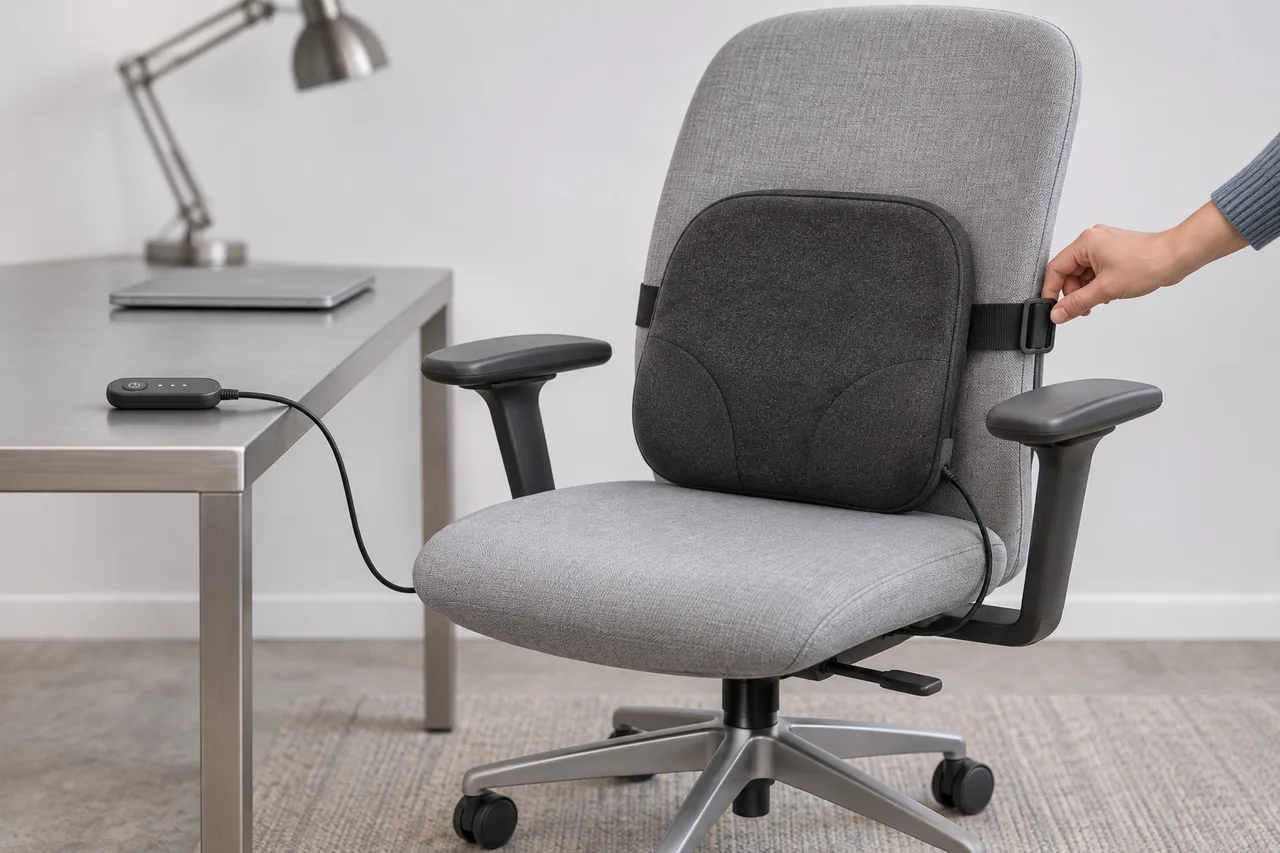
Place the cushion as directed by its instructions, using the strap to hold it against the chair back. Check that it stays in place without making your sitting position uncomfortable.
However, adding a physical foam cushion behind your back alters your seating posture by reducing available seat pan depth. Pushing your torso forward on the seat pan changes how your thighs rest on the cushion and alters your position relative to your desk, keyboard, and computer monitor. When setting up a lumbar back support heat cushion, check whether your overall seat height, armrest position, or monitor distance needs adjustment so you remain comfortably positioned without straining your neck or shoulders.
Power cable management is another vital consideration when setting up a corded chair cushion. Always route the electrical cord safely away from walkways and seating movement. Never tie, wrap, or attach electrical power cables to moving parts, swivel mechanisms, or rolling caster wheels of an office chair. Catching a power cable under rolling wheels or twisting cords inside a chair's swivel mechanism can strip cable insulation, crush internal wires, pull plugs from wall sockets, and create severe electrical short-circuit and tripping hazards. Route the power cord loosely along fixed desk edges or stationary furniture to ensure safe, unhindered operation.
Physiological Principles of Heat Therapy and Health Authority Guidance
General heat-therapy guidance from Spine-health, Healthline and Medical News Today describes warmth as one option for temporary comfort from muscle stiffness. It does not establish a treatment result for a particular cushion.
Health literature also clarifies the distinction between heat and cold application:
Cold Therapy Applications: Cold packs or ice compresses are most effective for brand-new, acute injuries or sudden swelling (typically within the first 48 hours). Cold application induces vasoconstriction (narrowing of blood vessels), limiting blood flow to diminish acute inflammation and numb sharp discomfort.
Heat Therapy Applications: Thermal heat therapy is ideal for ongoing muscle stiffness, chronic lower back tightness, and non-inflammatory aches. Surface warmth relaxes tight muscle fibers and eases daily spinal stiffness.
While health literature explains the physiological mechanisms of blood circulation and muscle relaxation, general thermotherapy principles do not constitute clinical proof of guaranteed benefits or medical cures. A back heating pad or heated lumbar cushion is a supportive home comfort tool designed to soothe everyday muscle tightness; it does not cure sciatica, repair herniated lumbar discs, or fix structural spinal injuries. Furthermore, health guidance should not be interpreted as prescribing a universal heating duration or fixed temperature setting for every individual.
Dermatological Risks: Understanding Toasted Skin Syndrome
A crucial dermatological consideration associated with repeated heating pad use is Toasted Skin Syndrome, medically known as Erythema Ab Igne. As documented by dermatological resources at the Cleveland Clinic, toasted skin syndrome is a skin condition caused by repeated, prolonged exposure to low-level heat or infrared radiation that is not hot enough to cause an immediate thermal burn.
When a heating pad, warm cushion, or heat wrap is left against bare skin or thin clothing for extended periods day after day, the low-level heat causes localized changes in skin blood vessels and elastic fibers. This results in a characteristic net-like, reticulated pattern of hyperpigmentation, skin redness, and brown discoloration across the warmed area.
To protect your skin against toasted skin syndrome, users must avoid continuous, unbroken heat application. Never assume that using a low heat setting or relying on a timer makes all-day continuous heat exposure safe. Limit warming sessions to short, discrete periods, inspect your skin regularly for redness or discoloration, and take frequent movement breaks away from your chair to allow your skin to cool naturally.
Fabric Care, Maintenance, and Thermal Safety Rules
Preserving fabric hygiene while maintaining electrical safety requires following official care guidelines and practicing strict thermal safety.
Always inspect the care label and official product manual for your specific cushion before attempting to clean it. For models featuring a removable cover—such as the removable velour cover on the Drive Medical Comfort Touch cushion—remove the fabric cover and launder it according to the manufacturer's directions. Never submerge the inner polyurethane foam cushion, internal electrical heating components, power cords, or on/off switches in water. Ensure the removable fabric cover is completely dry before reassembling it over the foam core and reconnecting the power supply.
Strict safety precautions must be maintained during every warming session:
STRICT SAFETY WARNING: NEVER MICROWAVE ELECTRIC APPLIANCES: Never place any electric heating pad, corded lumbar cushion, power cord, or electrical switch inside a microwave oven. Microwaving electrical components can create a fire hazard. Microwaving is strictly restricted to non-electric, specially labeled organic grain or gel packs.
ABSOLUTE PROHIBITION ON SLEEPING WITH ACTIVE HEAT: Never wear or use any operating electric heating pad, heated cushion, or thermal appliance while sleeping or napping. Falling asleep with an active electric heating pad significantly reduces your sensory awareness of rising skin temperatures, dramatically increasing the risk of thermal skin burns and electrical hazards. Always turn off, unplug, and remove any heating device before lying down to sleep.
Active Skin Monitoring: Inspect your skin periodically during every warming session. If a heating cushion feels uncomfortably hot or causes skin irritation at any point, stop using the device immediately and turn off the power supply. Do not attempt to cushion an uncomfortably hot pad with extra towels to force continued use.
Follow the specific operating instructions and safety warnings provided in your individual product's user manual.
Cong
Cong draws on years of experience in electric heating product processing and manufacturing, together with market research, to explain personal heating products in practical terms.
View author profile