
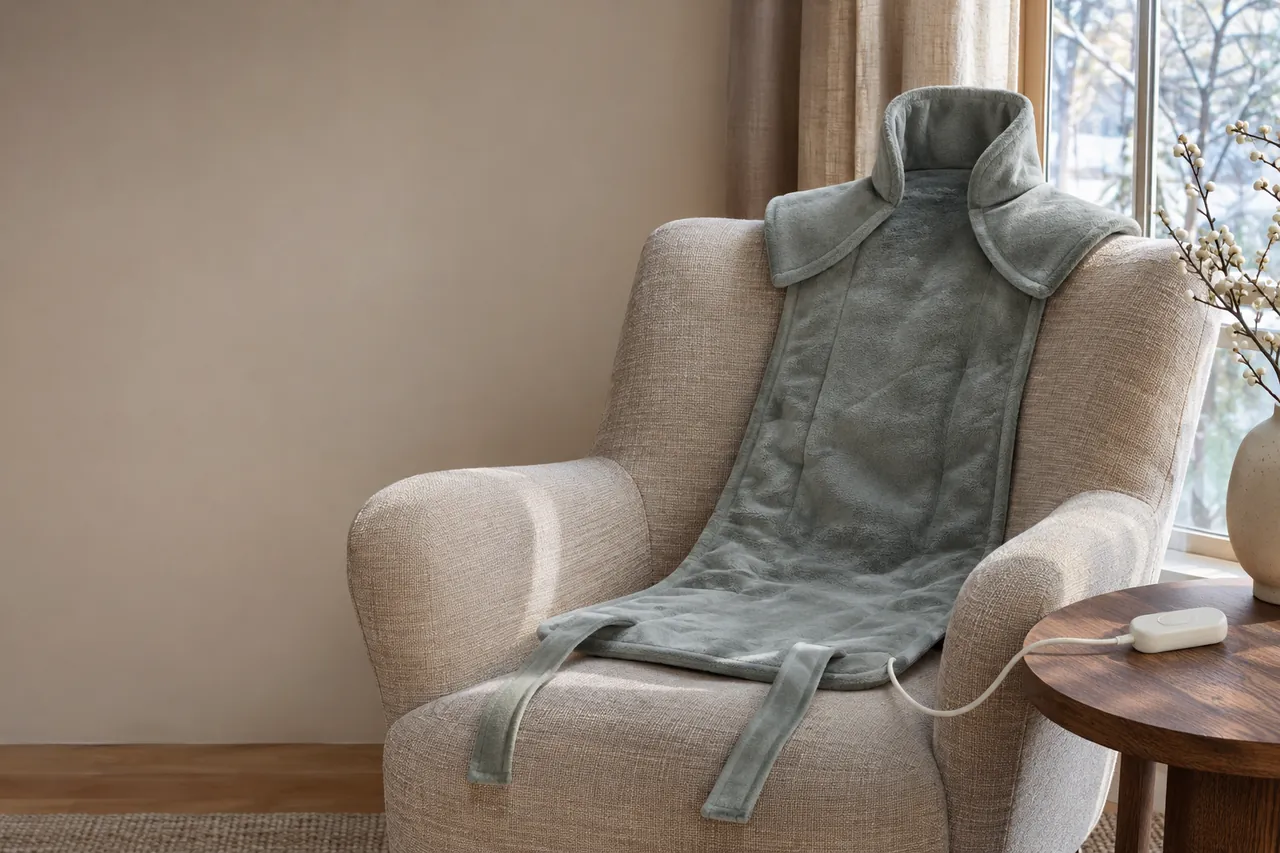
Can you put a back heating pad between your body and a chair? The answer depends on the product instructions. Sunbeam’s GoHeat 2000-825 manual warns against sitting on or leaning against the pad, so a chair back cannot be treated as a way to hold that model in place.
Introduction
Start by checking placement and pressure rules. Then consider the chair’s separate role in supporting your back, the design of the warming product, and how to monitor your skin during a break.
Can You Lean Back Against the Pad?
A GoHeat Warning: Do Not Lean On or Crush the Pad
Heating devices have different constructions and operating instructions. The way a device is placed against the body and furniture matters for safe use.
Official product user manuals for electric heating devices—such as the user manual for the Sunbeam 2000-825 GoHeat Cordless Heating Pad—explicitly mandate strict operational warnings: do not sit on, lean against, crush, or fold the pad during use, and do not cover it with insulating material.
Understanding why manufacturers prohibit leaning against or crushing heating pads is essential for household safety:
Trapped Thermal Buildup: Pressing your body weight against a heating pad or trapping it tightly between your back and a thick chair cushion prevents normal heat dissipation. The manufacturer’s warning is designed to reduce burn risk.
Internal Circuit Damage: Bending, folding, or crushing an electric pad can damage the device; avoid these positions when the instructions prohibit them.
Insulating Material Risk: Covering an active pad with heavy blankets, foam cushions, or insulating outerwear can interfere with safe operation when the manufacturer prohibits covering the pad.
For the GoHeat 2000-825, do not put the pad between your back and the chair or sit on it. If you want a product designed for use against a chair back, choose one whose own instructions explicitly allow that position. Adjust the chair for support separately from the warming device.
What OSHA Workstation Chair Guidance Covers
A chair still needs to support you once the pad is put away. OSHA recommends a backrest that follows the spine’s natural curve, a seat that lets your feet rest on the floor or a footrest, and armrests that let your shoulders relax. Adjust the chair together with the desk, keyboard and monitor, and change position through the workday.
Once the pad is off and put away, OSHA suggests a rolled towel or removable lumbar cushion as temporary back support if your chair lacks it. Adjust the support so it fits the curve of your lower back. Do not place a towel over the active GoHeat pad: its instructions prohibit covering it with insulating material.
A Work Break: Position, Skin and Safety
When taking a scheduled work break to soothe lower back tightness, following structured operational procedures protects your skin while providing comforting warmth.
Step-by-Step Work Break Routine
Pause Desk Work: Step away from continuous keyboard typing and sit comfortably upright or stand near your desk without leaning backward against a chair backrest.
Position as Directed: Place the pad only as its instructions allow, with no folding, overlapping or pressure from your chair.
Select Low Heat: Start your session on the lowest temperature setting to evaluate thermal intensity.
Keep Sessions Within the Label Directions: Stop at the duration specified for your device and check your skin throughout use.
Increased Burn Risk from Reduced Skin Sensation
As detailed in consumer safety guidance from Comfytemp regarding heating pad burn risks, individuals with reduced skin sensation—such as seniors, individuals with diabetes, peripheral neuropathy, or impaired blood circulation—face significantly higher risks of thermal skin burns. Reduced sensation can make heat injury harder to notice. The GoHeat 2000-825 manual says the pad is not to be used by people with diabetes, poor blood circulation or insensitivity to heat, among others listed in its safety instructions.
Preventing Toasted Skin Syndrome (Erythema Ab Igne)
A primary dermatological risk associated with repeated, prolonged heat exposure is Toasted Skin Syndrome, medically known as Erythema Ab Igne. As documented by dermatological experts at the Cleveland Clinic, toasted skin syndrome is a skin condition caused by repeated, long-term exposure to low-level heat or infrared radiation that is warm enough to alter skin tissue over time but not hot enough to cause an immediate thermal burn.
Repeated exposure over weeks or months damages small blood vessels and elastic fibers in the skin, causing a characteristic net-like pattern of hyperpigmentation and brown discoloration across the warmed area. To protect your skin, avoid continuous heat exposure, limit sessions to short periods, inspect your skin regularly, and allow skin to cool naturally between uses.
Essential Operational Safety Rules
Use While Awake Only: Never use any electric heating pad or battery-operated wrap while sleeping or napping. Reduced sensory awareness during sleep prevents you from detecting thermal discomfort.
Active Skin Monitoring: Inspect your skin underneath the pad frequently during every session. If the pad feels uncomfortably hot, or if skin shows redness or irritation, stop using the device immediately.
Microwave safety: Keep the electric pad, battery and charging cord out of the microwave. Only microwave a separate pack when its own instructions explicitly allow it, and follow those instructions.
Compare the Available Formats and Fit
Before taking a scheduled relaxation break at your desk, taking time to evaluate product formats, waist sizing, and power technical specifications ensures a safe and comfortable experience.
Comparing Personal Warming Formats
When evaluating options from manufacturer catalogs—such as the Comfytemp targeted heating pads and wraps collection and Sunbeam heat therapy products—shoppers encounter two primary electric designs:
Cordless Wearable Heating Belts: Products like the Sunbeam GoHeat Cordless Heating Pad feature an adjustable fabric strap that secures around your waist. A wearable belt holds the heating surface lightly against your lower back while you stand or sit upright, eliminating the temptation to lean backward against a chair backrest to keep the pad in place.
Mains-Powered Corded Heating Pads: Corded electric pads connect directly to a wall socket through a power cord, supplying continuous electrical power for stationary rest breaks near a wall outlet.
Examining Technical Specifications (Sunbeam GoHeat Example)
To understand how technical specifications are documented, examine published product details for the Sunbeam GoHeat Cordless Heating Pad:
Thermal Settings: Features an inline controller offering 3 adjustable heat settings (Low, Medium, and High) to customize surface warmth.
Battery Power Specification: Sunbeam lists up to four hours of battery life on the low setting and a two-hour automatic shutoff. Battery life and the shutoff interval are separate specifications.
Hands-Free Strap Fit: Incorporates an adjustable fabric strap that wraps around the torso to hold the pad in position.
Machine-Washable Fabric: Sunbeam describes the pad and strap as machine washable after the battery unit is removed and the pad cable disconnected, following the listed care instructions.
Crucial Distinction: Battery Runtime vs. Safe Wear Duration
Sunbeam lists up to four hours of battery life on low, but the GoHeat manual gives separate use guidance: 20 minutes on high or two hours on low. The device also has a two-hour automatic shutoff. These are instructions and specifications for this model; remain awake, check the skin frequently and stop if the heat becomes uncomfortable.
Applying continuous thermal heat to the same skin area for extended periods increases the risk of thermal skin burns and dermatological irritation. Users should never treat a 4-hour battery runtime as permission for unbroken heat application. Always use heating pads for short, discrete sessions and allow skin to cool down between uses.
After the Break: Movement and Care
After concluding your warming session and turning off your device, engaging in gentle physical activity and proper maintenance supports long-term lower back comfort.
Transitioning to Gentle Movement and Posture
Once your warming break ends, consider a comfortable change of position:
Take a Short Walk: Walk around your office or home for a few minutes to encourage active blood circulation through your lower limbs and waist.
Move Comfortably: Change position or stretch gently if comfortable, stopping if a movement worsens symptoms.
Re-Align Desk Ergonomics: Adjust your office chair backrest, armrest height, and computer monitor position to maintain neutral posture during your next work block.
Insights from Physical Therapy Hot Packs
Educational literature from Verywell Health regarding physical therapy hot packs explains how thermal application is utilized in clinical rehabilitation settings. Physical therapists apply thermal compresses for short intervals as a passive preparatory modality to relax tight muscle tissue, increase tissue extensibility, and prepare joints for active exercise.
However, physical therapy guidance highlights an important principle: heat can provide temporary comfort; workplace setup and movement are separate considerations.
How warmth fits into a work break
According to clinical resources from the Cleveland Clinic, applying gentle surface warmth prompts localized blood vessels to expand (vasodilation). Heat can provide temporary comfort for muscle tightness, but it does not establish the cause of pain.
Keep the chair’s support and the warming device’s placement as separate decisions. After switching off the pad, take time to move and return to a comfortable sitting position.
For desk workers evaluating options for a targeted lumbar and back heating wrap, selecting a wearable wrap equipped with adjustable waist straps, clear heat settings, and automated safety controls helps match the device to a routine that follows its safety instructions.
Device Care and Maintenance
Always follow the exact care directions printed in your product's user manual. For machine-washable models like the Sunbeam GoHeat, detach the battery unit and power connectors before laundering the fabric pad on a gentle cycle. Allow all fabric components to dry completely before reconnecting power sources.
References
Sunbeam — GoHeat™ Cordless Heating Pad
Sunbeam — GoHeat Cordless Heating Pad User Manual
Sunbeam GoHeat 2000-825 and 2003-825 manual (PDF)
Sunbeam — Pain Relief with Heat Therapy
https://www.sunbeam.com/pain-relief-education.html
Comfytemp — Heating Pad Safety Burn: Who's Most at Risk at Home
https://comfytemp.com/blogs/news/heating-pad-safety-burn-risk
Comfytemp — Electric Heating Pads for Pain Relief & Muscle Relaxation
https://comfytemp.com/collections/heating-pad
Occupational Safety and Health Administration (OSHA) — Computer Workstations - Workstation Components - Chairs
https://www.osha.gov/etools/computer-workstations/components/chairs
Cleveland Clinic — Back Spasms: Causes, Treatment & What Is It
https://my.clevelandclinic.org/health/diseases/22881-back-spasms
Cleveland Clinic — What Is Toasted Skin Syndrome (Erythema Ab Igne)?
https://my.clevelandclinic.org/health/diseases/toasted-skin-syndrome
Cleveland Clinic — How To Get Rid of Muscle Knots
https://health.clevelandclinic.org/what-are-muscle-knots-and-how-do-i-get-rid-of-them
Verywell Health — Hot Packs Used in Physical Therapy
https://www.verywellhealth.com/hot-packs-physical-therapy-modalities-2696130